
Finding Software in Ubuntu 12.04 from the command line
ubuntero_search

With so many packages available, it can be hard to find the exact thing you need using command-line APT. The general search tool is called apt-cache and is used like this: djx@ubuntu:~$ apt-cache search kde Depending on which repositories you have enabled, that tool returns about a thousand packages. Many of those results will not … Read more

Choosing an Email Client: Evolution

evolution_email_ubuntero

Up until Ubuntu 11.10, Evolution was the standard email client in Ubuntu, although to call it simply an email client is to sincerely underrate its usefulness as an application. Not only does it handle email, but it can also look after contacts and calendars and help you manage your tasks. With Evolution, you can handle … Read more

Unity Power Shortcuts

ubuntero_power_shortcuts

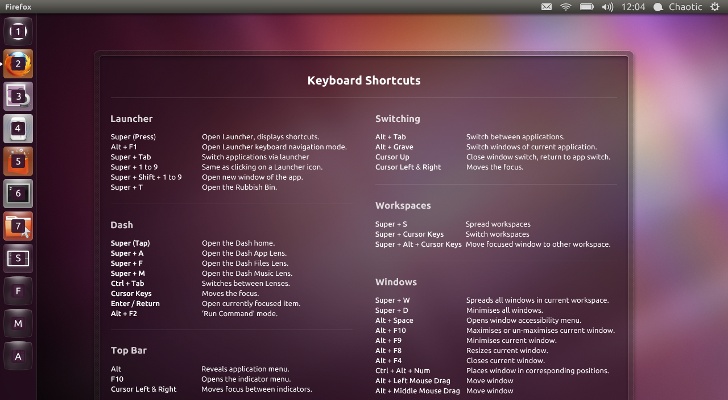
Often, power users want to avoid using the mouse. They don’t want to take their hands off of the keyboard unless absolutely necessary because doing so slows them down. Here are some of the more useful keyboard shortcuts that readers of this book are likely to appreciate, many of which can be configured or adjusted … Read more

QRENCODE the QR creation software for UBUNTU

ubuntero_qr

QR code creation in Ubuntu is very simple. For this we have to install the app ‘qrencode’ which you can install from the software center or just opening your terminal and typing: $ sudo apt-get install qrencode After installation you can create QR codes with the command line using the following structure: $ qrencode-o [AnyNameForYourQRcode.png] … Read more

Fixing the high CPU Usage error in UBUNTU

CPU_100

There is a problem installing Ubuntu 10.04 and other versions, with some systems running with Dual Core or Core 2 Duo, a process in the system has and maintains one of the cpus at 100%, causing heating problems and ultimately harming our operating system solution First we have to check what process is causing the … Read more

Enable Full DVD Playback

Enable Full DVD Playback Ubuntu Quetzal

Enable Full DVD Playback in Ubuntu 12.04 LTS Though installing the restricted extras package will solve most of your problems, you may not be able to play dual layer dvds yet in your Ubuntu. Most commercial DVDs are encrypted with CSS (the Content Scrambling System), which attempts to restrict the software that can play a DVD. … Read more

Install Ubuntu Restricted Extras

Ubuntero_Unity_ubuntu_restricted_extras

Ubuntu Restricted Extras is probably the first package you should install in Ubuntu. You will soon notice that a lot of things do not work after your first run. You cannot listen to MP3 files or watch many movies; even DVDs. Browsing the web means doing so without Flash and Java, and certain websites don’t … Read more

How to install Ubuntu

First place the DVD into your dvd drive and restart your pc. The preliminary display provides a wide range of different languages for you to use during the set up and two alternatives: Try Ubuntu: By running Ubuntu from the DVD without making any changes to your pc so that when you eliminate the DVD … Read more